hunky.
diffs for the age of AI
A terminal UI that watches your repository and shows each diff as it lands. See what your agent changed, stage what you want, commit.
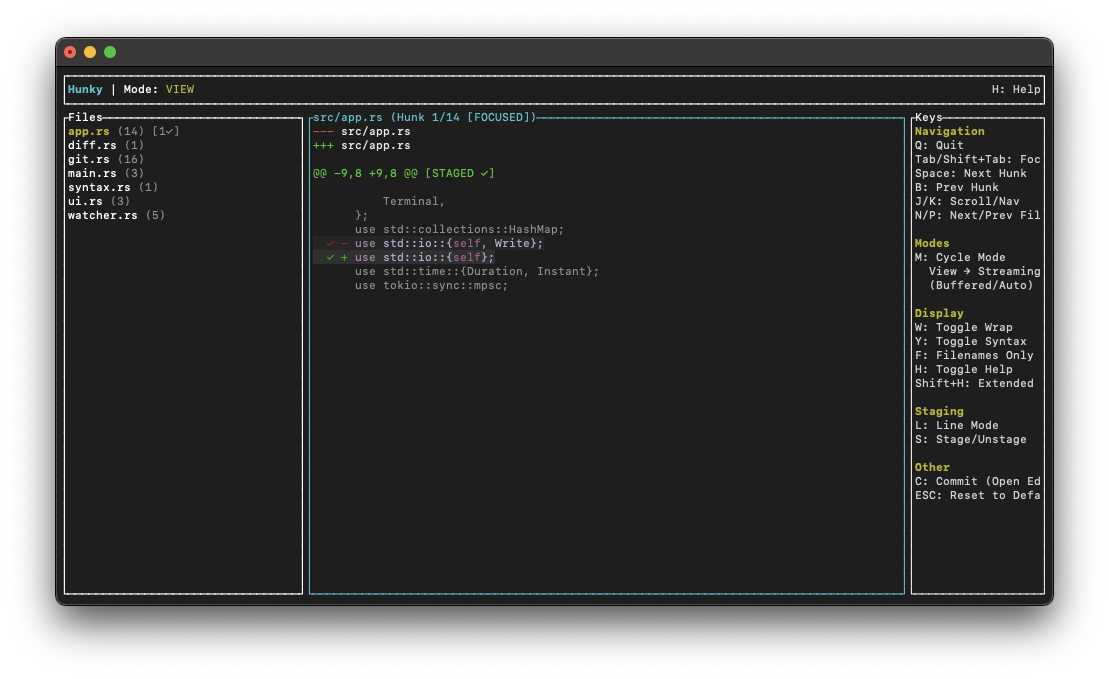
A terminal UI that watches your repository and shows each diff as it lands. See what your agent changed, stage what you want, commit.
Watches the working tree and updates as files change. No refresh.
Streaming mode skips what was already there and shows new hunks one at a time, stepped by hand or auto-advanced.
Stage a whole hunk or pick individual lines, then commit in your git editor.
Pick a recent commit and walk its hunks, marking each one accepted.
# Run directly without installingnix run github:randymarsh77/hunky# Or add to your flake inputshunky.url = "github:randymarsh77/hunky";# Then use the packagehunky.packages.${system}.defaultRequires Nix with flakes enabled.
# macOS (Apple Silicon)curl -LO https://github.com/randymarsh77/hunky/releases/latest/download/hunky-aarch64-apple-darwin.tar.gztar xzf hunky-aarch64-apple-darwin.tar.gzsudo mv hunky /usr/local/bin/# macOS (Intel)curl -LO https://github.com/randymarsh77/hunky/releases/latest/download/hunky-x86_64-apple-darwin.tar.gztar xzf hunky-x86_64-apple-darwin.tar.gzsudo mv hunky /usr/local/bin/# Linux / WSL (ARM64)curl -LO https://github.com/randymarsh77/hunky/releases/latest/download/hunky-aarch64-unknown-linux-gnu.tar.gztar xzf hunky-aarch64-unknown-linux-gnu.tar.gzsudo mv hunky /usr/local/bin/# Linux / WSL (x86_64)curl -LO https://github.com/randymarsh77/hunky/releases/latest/download/hunky-x86_64-unknown-linux-gnu.tar.gztar xzf hunky-x86_64-unknown-linux-gnu.tar.gzsudo mv hunky /usr/local/bin/# Windows (ARM64)curl -LO https://github.com/randymarsh77/hunky/releases/latest/download/hunky-aarch64-pc-windows-msvc.zippowershell -c "Expand-Archive hunky-aarch64-pc-windows-msvc.zip -DestinationPath ."# Add hunky.exe to your PATHpowershell -c "New-Item -ItemType Directory -Force -Path $env:USERPROFILE/bin | Out-Null"powershell -c "Move-Item -Path ./hunky.exe -Destination $env:USERPROFILE/bin/hunky.exe -Force"# Windows (x86_64)curl -LO https://github.com/randymarsh77/hunky/releases/latest/download/hunky-x86_64-pc-windows-msvc.zippowershell -c "Expand-Archive hunky-x86_64-pc-windows-msvc.zip -DestinationPath ."# Add hunky.exe to your PATHpowershell -c "New-Item -ItemType Directory -Force -Path $env:USERPROFILE/bin | Out-Null"powershell -c "Move-Item -Path ./hunky.exe -Destination $env:USERPROFILE/bin/hunky.exe -Force"All platforms and versions are on Releases.
# Clone the repositorygit clone https://github.com/randymarsh77/hunky.gitcd hunky# Build with Cargocargo build --release# The binary will be at target/release/hunky./target/release/hunky --help
Requires the
Rust toolchain
(cargo, rustc). Use nix develop for a pre-configured environment.